
Adjusting the Movable Sensor for Web (Gap) Sensing
If you experience issues with your labels constantly needing to be re-calibrated you may need to adjust the position of the movable sensor. This sensor detects the gap between each label on the roll.
Start by opening your printer and removing your labels from betwen the label guides. You should see the yellow media sensor which is located behind the rubber platen roller as shown in the below image:
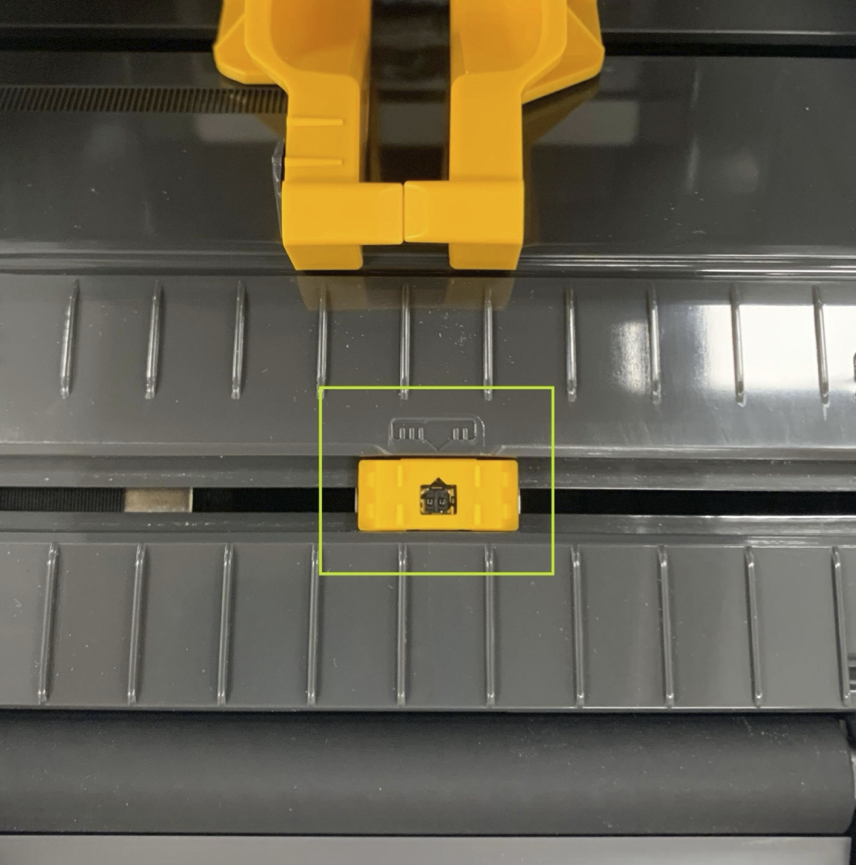
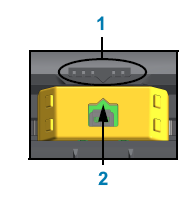
For most standard labels with a gap, the label sensor will need to be in the centre as shown in the image below, otherwise the printer may skip labels or print across 2 labels. The arrow 1 should line up with the arrow 2.
Also, please ensure the sensor is clean and free from any debris or stuck labels.
After adjusting the sensor it may be necessary to perfrom a media calibration by holding down the PAUSE + CANCEL buttons for two seconds. Please see the Media Calibration guide for full SmartCal and Manual Calibration steps.
If manual calibration fails, or needs to be repeated a lot - you may need to clean the platen roller - ensuring there is no damage to the rollers latch-release tabs. Please see the Printer Roller Maintenance guide.